元素水平垂直居中的方法有哪些? 如果元素不定宽高呢?
背景
在开发中经常遇到这个问题, 即让某个元素的内容在水平和垂直方向上都居中, 内容不仅限于文字, 可能是图片或其他元素
居中是一个非常基础但又是非常重要的应用场景, 实现居中的方法存在很多, 可以将这些方法分成两个大类:
- 居中元素(子元素)的宽高已知
- 居中元素宽高未知
实现方式
实现元素水平垂直居中的方式:
- 利用定位 + margin: auto
- 利用定位 + margin: 负值
- 利用定位 + transform
- table布局
- flex布局
- grid布局
利用定位 + margin: auto
先上代码:
<style>
  .father{
    width: 500px;
    height: 300px;
    border: 1px solid #0a3b98;
    position: relative;
  }
  .son{
    width: 100px;
    height: 40px;
    background: #f0a238;
    position: absolute;
    top: 0;
    left: 0;
    right: 0;
    bottom: 0;
    margin: auto;
  }
</style>
<div class="father">
  <div class="son"></div>
</div>
父级设置为相对定位, 子级绝对定位 , 并且四个定位属性的值都设置了0, 那么这时候如果子级没有设置宽高, 则会被拉开到和父级一样宽高
这里子元素设置了宽高, 所以宽高会按照我们的设置来显示, 但是实际上子级的虚拟占位已经撑满了整个父级, 这时候再给它一个margin: auto它就可以上下左右都居中了
利用定位 + margin: 负值
绝大多数情况下, 设置父元素为相对定位, 子元素移动自身50%实现水平垂直居中
<style>
  .father {
    position: relative;
    width: 200px;
    height: 200px;
    background: skyblue;
  }
  .son {
    position: absolute;
    top: 50%;
    left: 50%;
    margin-left: -50px;
    margin-top: -50px;
    width: 100px;
    height: 100px;
    background: red;
  }
</style>
<div class="father">
  <div class="son"></div>
</div>
整个实现思路如下图所示:
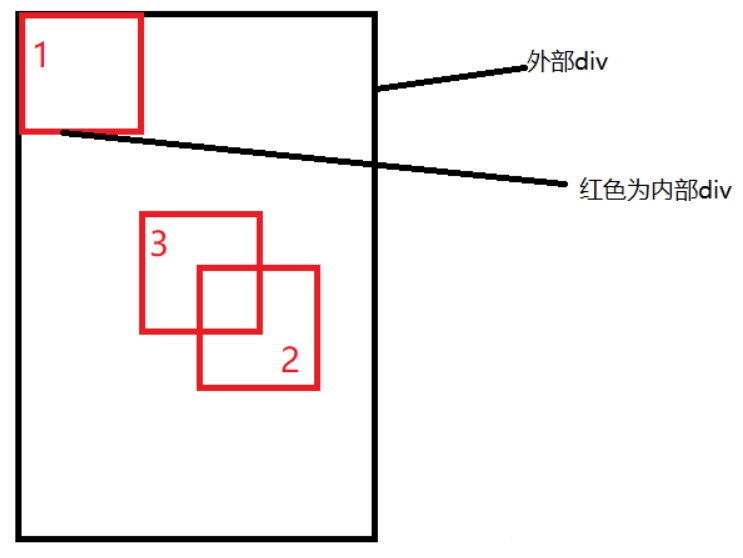
- 初始位置为方块1的位置
- 当设置left、top为50%的时候, 内部子元素为方块2的位置
- 设置margin为负数时, 使内部子元素到方块3的位置, 即中间位置
这种方案不要求父元素的高度, 也就是即使父元素的高度变化了, 仍然可以保持在父元素的垂直居中位置, 水平方向上是一样的操作
但是该方案需要知道子元素自身的宽高, 但是我们可以通过下面transform属性进行移动
利用定位 + transform
实现代码如下:
<style>
  .father {
    position: relative;
    width: 200px;
    height: 200px;
    background: skyblue;
  }
  .son {
    position: absolute;
    top: 50%;
    left: 50%;
    transform: translate(-50%, -50%);
    width: 100px;
    height: 100px;
    background: red;
  }
</style>
<div class="father">
  <div class="son"></div>
</div>
translate(-50%, -50%)将会将元素位移自己宽度和高度的-50%
这种方法其实和最上面被否定掉的margin负值用法一样, 可以说是margin负值的替代方案, 并不需要知道自身元素的宽高
table布局
设置父元素为display: table-cell, 子元素设置 display: inline-block。利用vertical和text-align可以让所有的行内块级元素水平垂直居中
<style>
  .father {
    display: table-cell;
    width: 200px;
    height: 200px;
    background: skyblue;
    vertical-align: middle;
    text-align: center;
  }
  .son {
    display: inline-block;
    width: 100px;
    height: 100px;
    background: red;
  }
</style>
<div class="father">
  <div class="son"></div>
</div>
flex弹性布局
还是看看实现的整体代码:
<style>
  .father {
    display: flex;
    justify-content: center;
    align-items: center;
    width: 200px;
    height: 200px;
    background: skyblue;
  }
  .son {
    width: 100px;
    height: 100px;
    background: red;
  }
</style>
<div class="father">
  <div class="son"></div>
</div>css3中了flex布局, 可以非常简单实现垂直水平居中
这里可以简单看看flex布局的关键属性作用:
- display: flex时, 表示该容器内部的元素将按照flex进行布局
- align-items: center表示这些元素将相对于本容器水平居中
- justify-content: center也是同样的道理垂直居中
grid网格布局
<style>
  .father {
    display: grid;
    align-items: center;
    justify-content: center;
    width: 200px;
    height: 200px;
    background: skyblue;
  }
  .son {
    width: 10px;
    height: 10px;
    border: 1px solid red
  }
</style>
<div class="father">
  <div class="son"></div>
</div>
这里看到, gird网格布局和flex弹性布局都简单粗暴
小结
上述方法中, 不知道元素宽高大小仍能实现水平垂直居中的方法有:
- 利用定位 + margin:auto
- 利用定位 + transform
- flex布局
- grid布局
总结
根据元素标签的性质, 可以分为:
- 内联元素居中布局
- 块级元素居中布局
内联元素居中布局
水平居中
- 行内元素可设置: text-align: center
- flex布局设置父元素: display: flex; justify-content: center
垂直居中
- 单行文本父元素确认高度: height === line-height
- 多行文本父元素确认高度: display: table-cell; vertical-align: middle
块级元素居中布局
水平居中
- 定宽: margin: 0 auto
- 绝对定位+left:50%+margin:负自身一半
垂直居中
- position: absolute设置left、top、margin-left、margin-top(定高)
- display: table-cell
- transform: translate(x, y)
- flex(不定高, 不定宽)
- grid(不定高, 不定宽), 兼容性相对比较差