你在React项目中是如何使用Redux的? 项目结构是如何划分的?
背景
在前面文章了解中, 我们了解到redux是用于数据状态管理, 而react是一个视图层面的库
如果将两者连接在一起, 可以使用官方推荐react-redux库, 其具有高效且灵活的特性
react-redux将组件分成:
- 容器组件: 存在逻辑处理
- UI 组件: 只负责现显示和交互, 内部不处理逻辑, 状态由外部控制
通过redux将整个应用状态存储到store中, 组件可以派发dispatch行为action给store
其他组件通过订阅store中的状态state来更新自身的视图
如何做
使用react-redux分成了两大核心:
- Provider
- connection
Provider
在redux中存在一个store用于存储state, 如果将这个store存放在顶层元素中, 其他组件都被包裹在顶层元素之上
那么所有的组件都能够受到redux的控制, 都能够获取到redux中的数据
使用方式如下:
<Provider store = {store}>
  <App />
</Provider>
connection
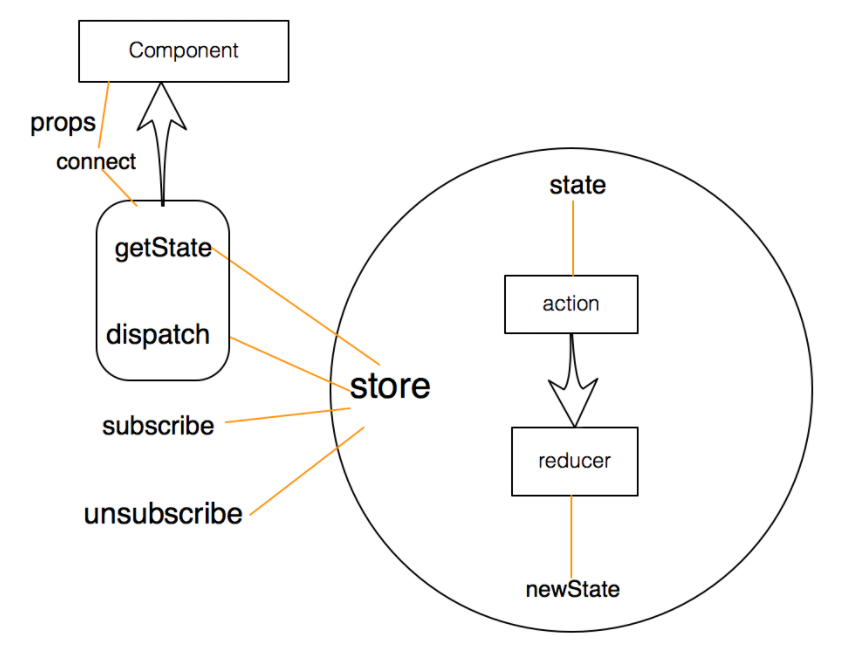
connect方法将store上的getState 和 dispatch 包装成组件的props
导入conect如下:
import { connect } from "react-redux";用法如下:
connect(mapStateToProps, mapDispatchToProps)(MyComponent)可以传递两个参数:
- mapStateToProps
- mapDispatchToProps
mapStateToProps
把redux中的数据映射到react中的props中去
如下:
const mapStateToProps = (state) => {
  return {
    // prop : state.xxx  | 意思是将state中的某个数据映射到props中
    foo: state.bar
  }
}组件内部就能够通过props获取到store中的数据
class Foo extends Component {
  constructor(props){
    super(props);
  }

  render () {
    return (
      // 这样子渲染的其实就是state.bar的数据了
      <div>{this.props.foo}</div>
    )
  }
}

Foo = connect()(Foo)
export default Foo
mapDispatchToProps
将redux中的dispatch映射到组件内部的props中
const mapDispatchToProps = (dispatch) => { // 默认传递参数就是dispatch
  return {
    onClick: () => {
      dispatch({
        type: 'increatment'
      });
    }
  };
}
class Foo extends Component {
  constructor(props) {
    super(props);
  }

  render () {
    return (
      <button onClick = {this.props.onClick}>点击increase</button>
    )
  }
}

Foo = connect()(Foo);
export default Foo;
小结
整体流程图大致如下所示:
项目结构
可以根据项目具体情况进行选择, 以下列出两种常见的组织结构
按角色组织(MVC)
角色如下:
- reducers
- actions
- components
- containers
参考如下:
reducers/
  todoReducer.js
  filterReducer.js
actions/
  todoAction.js
  filterActions.js
components/
  todoList.js
  todoItem.js
  filter.js
containers/
  todoListContainer.js
  todoItemContainer.js
  filterContainer.js
按功能组织
使用redux使用功能组织项目, 也就是把完成同一应用功能的代码放在一个目录下, 一个应用功能包含多个角色的代码
Redux中, 不同的角色就是reducer、actions和视图, 而应用功能对应的就是用户界面的交互模块
参考如下:
todoList/
  actions.js
  actionTypes.js
  index.js
  reducer.js
  views/
    components.js
    containers.js
filter/
  actions.js
  actionTypes.js
  index.js
  reducer.js
  views/
    components.js
    container.js
每个功能模块对应一个目录, 每个目录下包含同样的角色文件:
- actionTypes.js 定义action类型
- actions.js 定义action构造函数
- reducer.js 定义这个功能模块如果响应actions.js定义的动作
- views 包含功能模块中所有的React组件, 包括展示组件和容器组件
- index.js 把所有的角色导入, 统一导出
其中index模块用于导出对外的接口
import * as actions from './actions.js';
import reducer from './reducer.js';
import view from './views/container.js';

export { actions, reducer, view };
导入方法如下:
import { actions, reducer, view as TodoList } from './xxxx'Last updated on